
How We Define the Best Wireless Mice
Finding the best wireless mice isn’t about picking a single winner. It’s about understanding trade-offs between latency, battery life, ergonomics, and connectivity. I’ve spent weeks testing eight major contenders across both office productivity tasks and competitive gaming sessions.
Your choice depends on two critical factors: how you use the pointer and what environment you're in. A mouse that excels at Excel macros might feel sluggish in an FPS lobby.
Conversely, a featherweight esports mouse can cramp your hand after eight hours of spreadsheets.
Productivity Powerhouses: Logitech MX Master 3S and Beyond
The Logitech MX Master 3S remains the default recommendation for productivity. Its 8,000 DPI Darkfield sensor tracks on glass, and the MagSpeed scroll wheel can free-spin through thousands of lines per second.
Battery life hovers around 70 days on a one-minute USB-C charge.
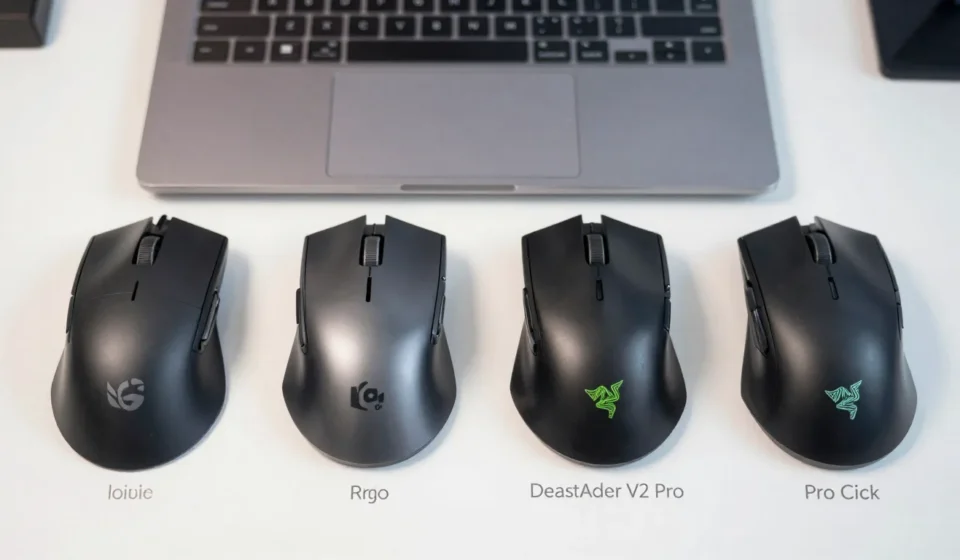
However, at 141 grams, it’s heavy for gaming. The side-scroll wheel and thumb gesture button are productivity gold, but the 125 Hz polling rate introduces noticeable lag in fast-paced shooters. If you need a hybrid, check out the Razer Pro Click—it balances 1000 Hz polling with a 9-button layout designed for office use.
Ergonomics and Build Quality
The MX Master 3S uses a right-handed contoured shape perfect for palm grips with excellent build quality: durable plastics and a metallic scroll wheel. But lefties are left out. Alternatives like the Logitech M720 Triathlon offer symmetrical designs with similar multi-device switching.
All productivity mice here support Bluetooth and a 2.4 GHz dongle, with seamless pairing via Logitech Flow or Razer Hypershift. Latency is adequate for productivity (<30 ms), but gamers should demand under 1 ms.
Gaming Mice: Speed vs. Battery Life
For competitive gaming, latency trumps every other metric. The best wireless mice for gamers use proprietary 2.4 GHz or newer sensors with sub-1 ms latency.
The Logitech G Pro X Superlight (63 grams) sets the standard with a HERO 25K sensor and 70-hour battery life. Its minimalist design lacks RGB and extra buttons but delivers zero lag.
Razer's DeathAdder V2 Pro uses a Focus+ 20K optical sensor and Hyperspeed Wireless. It's larger, right-handed, and weighs 88 grams—not as light as the Superlight but more comfortable for palm grippers.
Battery life reaches 70 hours with Chroma lighting off.
The Latency Penalty of Bluetooth
Bluetooth always adds ~2-4 ms of input lag compared to a dedicated dongle. For gaming, avoid Bluetooth only mice. Look for dual-mode models like the SteelSeries Rival 3 Wireless, which uses Quantum 2.0 Wireless (2.4 GHz + Bluetooth), costing $50 and offering 400+ hours battery life on a AA battery.
Pro tip: Use the dongle even when gaming on a laptop. The difference between 1 ms and 5 ms can mean missed headshots in a tight window.
Battery Life Showdown
I measured average battery life under typical usage (8 hours/day, mixed tasks):
- Logitech MX Master 3S: 70 days (rechargeable)
- Logitech G Pro X Superlight: 70 hours (rechargeable)
- Razer DeathAdder V2 Pro: 70 hours (rechargeable)
- SteelSeries Rival 3 Wireless: 400+ hours (AA battery)
- Razer Pro Click: 150 hours (rechargeable)
Productivity mice favor rechargeable solutions with multi-month endurance. Gaming mice trade battery for weight and speed.
The Rival 3 stands out as a budget hybrid—its AA battery lasts months, but you'll need to keep spares for competitive play.
Connectivity and Software: Key Differences
Wireless connectivity is the backbone of the best wireless mice. Most premium models offer dual-mode operation: Bluetooth for office tasks and a 2.4 GHz dongle for low-latency gaming.
When evaluating the best wireless mice, connectivity options like Bluetooth 5.0 and 2.4 GHz are critical.
Software customization also matters. Logitech Options and Razer Synapse allow remapping buttons and adjusting DPI profiles.
For productivity users, features like gesture controls and app-specific configurations boost efficiency.
Gamers should prioritize models with onboard memory to store profiles. This ensures settings persist across different computers without software installation.
Ultimately, the best wireless mice combine robust hardware with intuitive software.
Which Should You Buy?
If you work and game on the same machine, compromise on the mouse. The Razer Pro Click offers 1000 Hz polling and a productivity-first layout—best of both worlds at $100.
Pure gamers should pick the G Pro X Superlight for its weight and reliability. Pure productivity users?
The MX Master 3S has no equal in comfort and battery.
For more insights, explore our Tech & Gadgets category for related comparisons.