
The Real Differences Between Switch Types
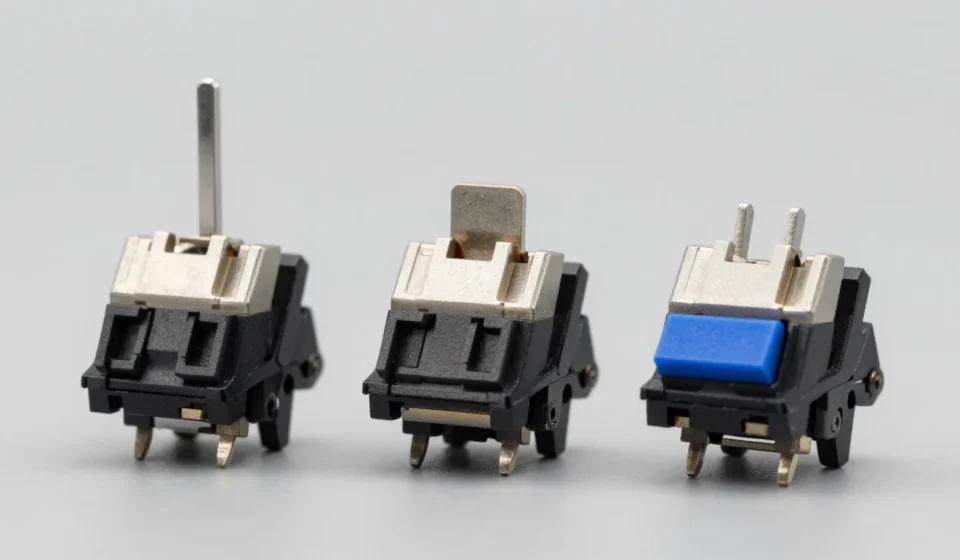
Mechanical keyboard switches fall into three broad categories: linear, tactile, and clicky. But the marketing around each often obscures practical trade-offs.
Let's strip away the hype and focus on measurable behaviors: actuation force, tactile feedback, and acoustic output.
Linear switches offer a smooth, uninterrupted keystroke with no tactile bump or audible click. Tactile switches provide a distinct bump at the actuation point, signaling registration without an audio cue.
Clicky switches combine the bump with a crisp clicking sound, often from a separate mechanism inside the switch housing.
Understanding Mechanical Keyboard Switches: Myths vs Reality
This section directly addresses the core topic of mechanical keyboard switches. Many enthusiasts claim that linear switches are best for gaming, but the reality is more nuanced.
The difference in reaction time between a trained gamer using linear vs tactile switches is negligible—on the order of milliseconds.
Games requiring rapid, repetitive presses may benefit from lighter linear switches, but tactile switches can improve precision where accidental presses matter. Pro gamers use both types.
The choice should hinge on personal feedback preference, not performance dogma.
Myth 1: Linear Switches Are Best for Gaming
This is the most persistent myth. The reasoning: linear switches allow faster double-taps because there’s no bump to overcome.
In reality, the difference is negligible. Actuation force and reset point are far more important for gaming performance.
For precise games, tactile switches can prevent errors. Many professional gamers use tactile switches.
Your preference should guide you, not the myth.
Myth 2: Tactile Switches Are Always Better for Typing
Tactile feedback can help you feel the actuation point, potentially reducing bottoming-out force. However, not all mechanical keyboard switches are created equal.
Some have a sharp, early bump, while others are gradual. For touch typists, the bump may be unnecessary.
Studies show no consistent speed advantage. Key weight is more critical.
Choose based on your finger strength and typing style.
Myth 3: Clicky Switches Are Too Loud for Offices
While clicky switches are louder than rubber domes, modern clicky mechanical keyboard switches vary widely in volume. Some produce a crisp, medium-pitched click that can be less intrusive than a bottomed-out linear switch with O-rings.
Many open-plan offices already have noise-canceling headphones. The pitch matters more than decibel level.
In quiet spaces, intermittent clicks may annoy.
Consider dampeners or quieter mechanisms if needed.
Myth 4: You Need to Try Every Switch Before Buying
Switch testers are useful, but they cannot replicate a full keyboard’s feel. Stabilizers, keycap profile, plate material, and case construction all affect sound and feel.
Focus on a few key specs: actuation force, tactile travel distance, and sound signature.
Online reviews with sound tests from Switch and Click or The Remin Goat provide more actionable data. Buy a cheap hot-swappable board to test real-world performance.
Myth 5: Linear Switches Are Always Smoother Than Tactile
Many budget mechanical keyboard switches have a scratchy feel due to leaf spring design. But high-end tactile switches like Zealios or Holy Pandas are as smooth as any linear.
The bump does not introduce friction if well-lubricated.
The quality of mechanical keyboard switches varies widely. Some linear switches can feel scratchy.
Measure by factory lubing and stem wobble, not by type.
Making Your Choice: A Practical Framework
Ignore the marketing tribes and focus on three questions: Do you want auditory feedback, a physical cue without sound, or the quietest, most consistent feel? Then test actuation force: 45g is light, 60g is medium, 80g+ is heavy.
Remember: there is no single best set of mechanical keyboard switches—only the best for your typing style and environment. The myths persist because enthusiasts treat preference as fact, but don’t fall for it. For more, visit our Tech & Gadgets section.